v1.2 · Local-first · Edge + Chrome

Every AI chat.
Finally yours.

Record or export ChatGPT, Claude, Gemini, Copilot and seven more to Markdown, PDF, JSON or Word — with code, tables, math and sources intact. Live-record new replies. Append to the notes you already keep. No account, no server, no limits.

Free during beta · no account · no uploads

11AI platforms
9export formats
0servers involved
50chats per batch
ChatGPTClaudeGeminiCopilotPerplexityDeepSeekGrokPoeMistralKimiDoubaoAny page ChatGPTClaudeGeminiCopilotPerplexityDeepSeekGrokPoeMistralKimiDoubaoAny page
Why another exporter

Most exporters stop at one file.
This one finishes the job.

The category is full of one-click downloads that fall over on batch, PDF and long conversations. Threadmark is built around the three things people actually do with an archive.

01

Batch that actually finishes

Pick conversations from the sidebar, hit export, and walk away. Threadmark opens each chat in a background tab, extracts it, and returns one ZIP with a live progress bar and a list of failures.

50 chats per run · background queue
02

PDF without a server

Print-grade pages are rendered in your browser, with cover metadata, page breaks around code, and proper type. No sign-in, no upload, no three-a-day cap — the file never leaves your machine.

Local print pipeline · unlimited
03

One library for every model

Every export lands in a searchable local library — filter by platform or tag, preview the conversation, re-export it as something else. Back the whole thing up as a single JSON file.

Full-text search · tags · ZIP
Recorder

It keeps writing after you hit export.

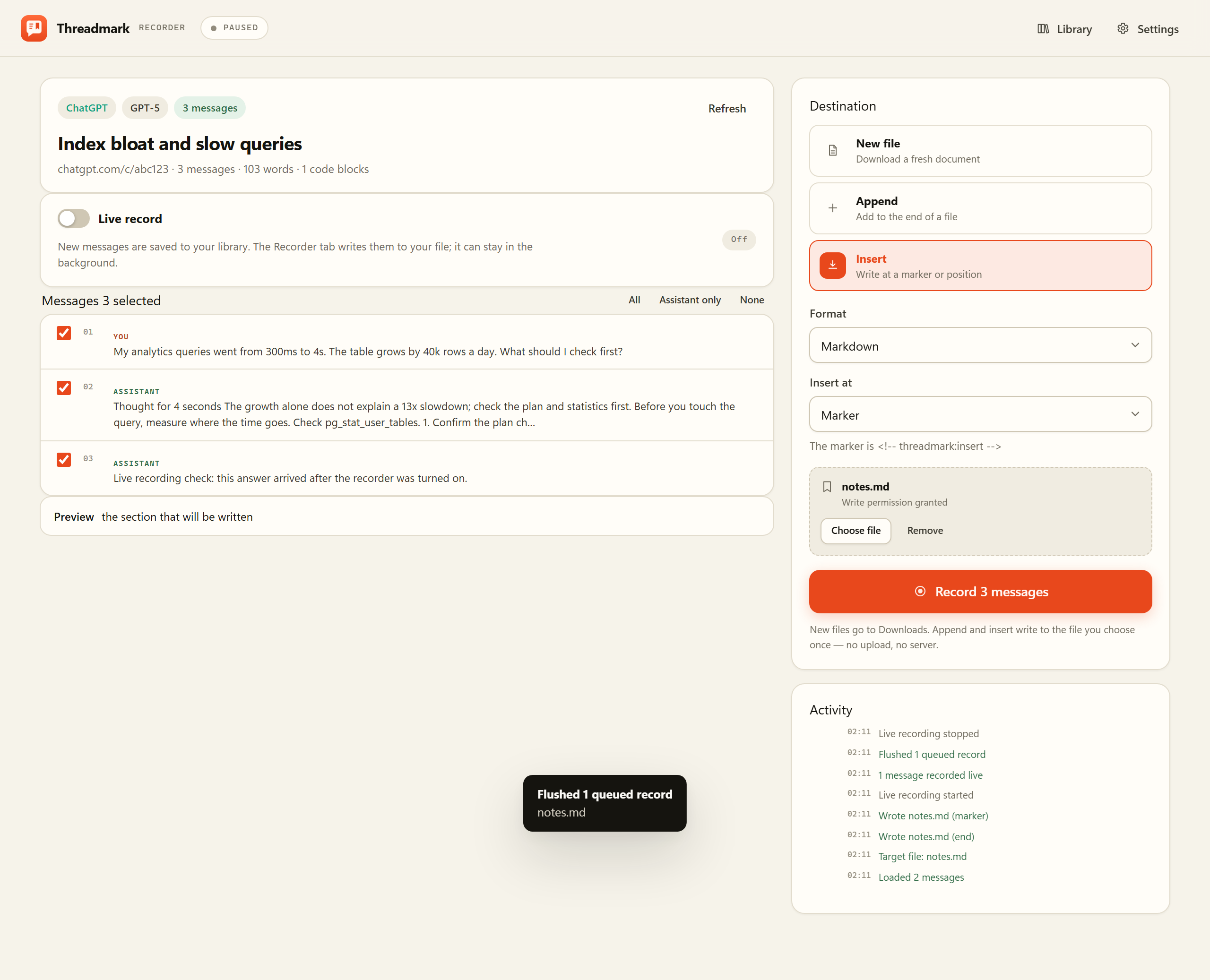
A recorder for the way conversations actually happen: turn it on, keep chatting, and Threadmark keeps the new replies. Then write exactly what you want to a new file, append it to an existing note, or insert it at a marker.

  1. 01
    Live, without the busywork

    A content observer watches the conversation. New replies are saved to your local library as they arrive — no button, no copy-paste, no server. The Recorder tab can sit in the background.

  2. 02
    Only the messages you pick

    Tick individual messages, take assistant replies only, or record a whole conversation. Batch still selects conversations from the sidebar. A record can be a single paragraph or a full transcript.

  3. 03
    New file, append or insert

    Choose a Markdown, text or HTML file once. Append writes to the end; Insert writes at <!-- threadmark:insert -->, after the title or at the top. File writes use the browser’s File System Access API — nothing is uploaded.

Append and insert need a local file target; JSON and CSV are new-file only. Live records are queued if the Recorder tab is closed, then written when you reopen it.

The Threadmark Recorder with message checkboxes, live record toggle and destination controls
The Recorder: live capture, message-level selection, and three write modes.
New · Local site

Your library, as a website.

Turn the whole library into a static archive you can open from a folder. A searchable dashboard, full transcripts, Markdown copies and metadata — generated locally, no server required.

  • 01
    Searchable index

    Filter by platform or tag, search titles and text, sort by date. Works offline from file://.

  • 02
    Full transcripts

    Each conversation gets its own HTML page with code, tables, math and source links intact.

  • 03
    Markdown + data.json

    A .md copy beside every transcript, plus metadata for your own tooling.

Generate from your library
What's inside

Small tool. Serious output.

Everything is designed around fidelity, speed and staying out of the way. No workspace, no onboarding carousel, no AI chat of its own.

Fidelity that survives

Fenced code with language, GFM tables, LaTeX, collapsible reasoning, source citations and images. Cleaned of buttons, avatars and tracking parameters.

Markdown · HTML · JSON

Nine formats, one click

Markdown, PDF, JSON, HTML, text, Word, CSV, Obsidian and Notion. Pick a default, keep the rest one click away in the popup.

9 formats · extendable schema

Presets, not settings

Obsidian gets YAML frontmatter and callouts. Notion gets paste-ready blocks. Filenames follow your template and folders stay tidy.

Filename tokens · folders

Reach for the keyboard

Alt+Shift+E exports. Alt+Shift+C copies Markdown. Right-click the page for formats, or use the floating button when you prefer the mouse.

Shortcuts · context menu · toolbar

Private by architecture

No analytics, no account, no server. Site access is optional and granted per site — not a blanket “read all websites” permission. The library lives in IndexedDB.

Local-first · least privilege

Bilingual, accessible, quiet

English and 简体中文, light and dark, keyboard-first and reduced-motion friendly. A utility that looks like one.

EN / 中文 · light / dark
Try the real serializer

One conversation.
Four ways out.

This is not a mockup. The panel below is generated from the same sample conversation by the extension’s own serializers — syntax, frontmatter, table and all.

ChatGPTGPT-5 · 4 messages
You

My analytics queries went from 300ms to 4s. The table grows by 40k rows a day. What should I check first?

Assistant

Before you touch the query, measure where the time goes. A 13× slowdown usually means the planner stopped using an index.

EXPLAIN (ANALYZE, BUFFERS) SELECT count(*) FROM events WHERE created_at > now() - interval '30 days';
You

Can I rebuild the index without locking writes?

Assistant

Yes — REINDEX CONCURRENTLY builds a new index beside the old one and swaps it in.

4 messages344 words2 code blocks1 table
2.9 KB
Loading sample…
index-bloat.md Download

Real output from Threadmark 1.2.0 · sample conversation included with the download

Output

Nine formats. No locks.

Every format is included in the free beta. PDF is rendered locally through your browser’s print pipeline, so there is no server, login or daily limit.

Markdown

.md

Clean GFM with YAML frontmatter, code fences and tables. The default for notes and version control.

Best for Obsidian, Git, notes

PDF

.pdf

Print-grade pages with metadata, code blocks that avoid page breaks, and a local print dialog.

Best for sharing, printing, archives

JSON

.json

A stable, documented schema with roles, timestamps, stats and message text. Ready for automation or RAG.

Best for pipelines, analysis, backups

HTML

.html

One self-contained document with readable typography. Open it anywhere, no app required.

Best for reading, sharing offline

Word

.doc

A Word-compatible document with styles and tables, for people who still live in Office.

Best for reports, editing, teams

Text

.txt

The most portable thing on a computer. Role headers, plain text, no formatting to break.

Best for search, grep, universal import

CSV

.csv

One row per message with role, timestamp, word count and text. UTF-8 BOM for Excel.

Best for spreadsheets, corpus work

Obsidian

.md

Frontmatter tags plus callout blocks for reasoning, so a vault import looks native.

Best for vaults, linked notes

Notion

.md

Paste-ready headings, lists and code blocks — no frontmatter to clean up.

Best for team wikis, docs
Privacy

Your chats are not our business.

There is no account, no analytics SDK and no API to call. The extension reads the page you are looking at and writes a file. That is the whole loop.

Local by architectureConversations are parsed and serialized in the browser. Nothing is uploaded, including PDFs.
Optional site accessThe extension asks for access per AI site, when you need batch or the floating button. It does not request “all websites”.
Your data is exportableThe library is IndexedDB, and a single JSON backup moves it. No cloud lock-in, no proprietary format.
The honest comparison

What you get that others don’t.

A typical single-site exporter is a PDF button with a paywall. This is the full job: batch, formats, library and local rendering.

CapabilityTypical single-site exporterThreadmark
PlatformsOne site, maybe two11 AI platforms + any page
FormatsPDF, maybe Markdown9 formats, including JSON, CSV, Word, Obsidian, Notion
BatchOne chat at a timeUp to 50 per run → one ZIP
PDF pipelineServer, login or daily capRendered locally, unlimited
LibraryNoneSearch, tags, preview, re-export
Site accessOften “all websites”Optional, per site, explained
AccountSometimes requiredNever
PriceFree with paywalled exportsFree in beta · Pro one-time, no subscription
The actual product

A quiet tool, not a workspace.

No side panels full of prompts, no chat client, no growth loops. A popup, a library and a settings page — all built to disappear after the export.

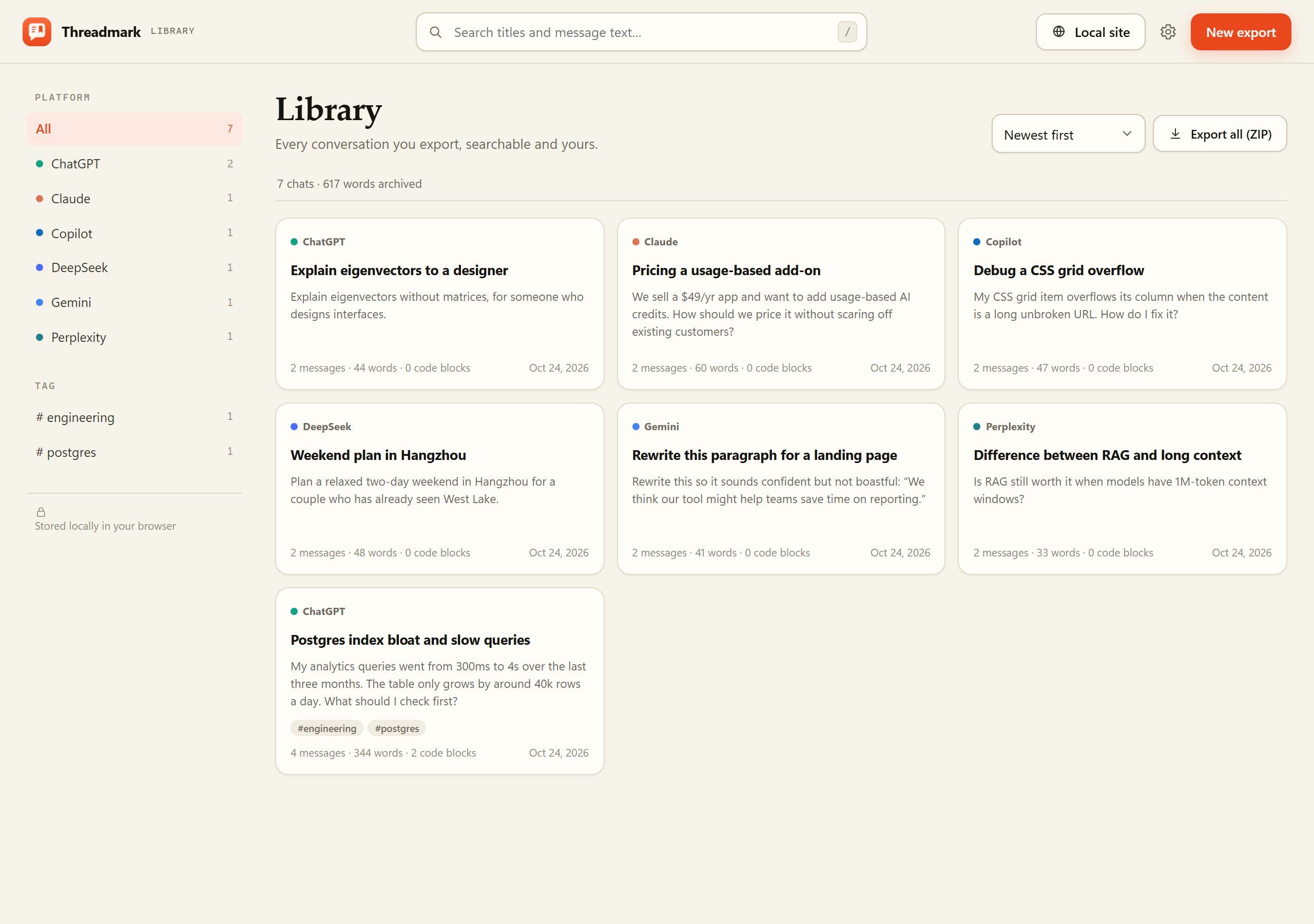
Threadmark — Library
Threadmark library with searchable conversation cards
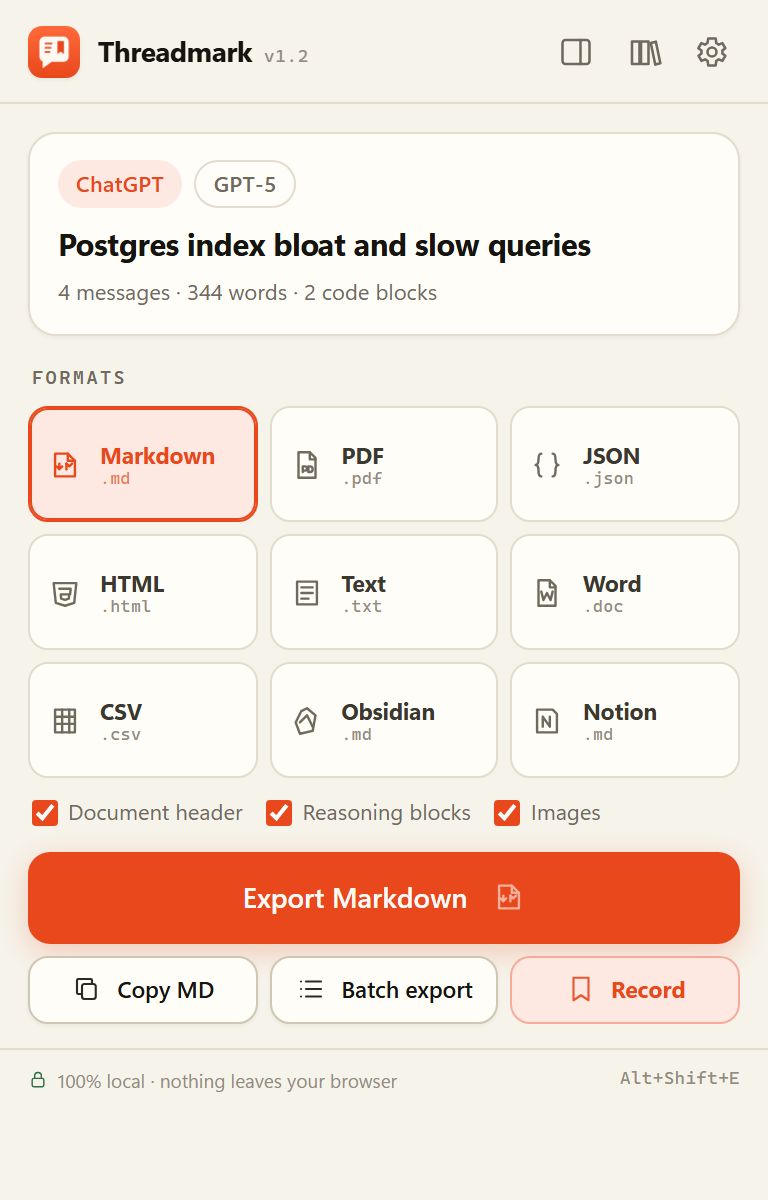
Threadmark popup with formats and export button
One popup, nine formats, a preview you can trust.
Pricing

Free now. Fair later.

The beta has no limits and no account. When Pro ships it will be a one-time purchase — not another subscription for a file button.

Available now

Free beta

$0free forever

Everything in v1. No trial, no watermark, no export counter.

  • 11 platforms and 9 formats
  • Unlimited local PDF and Word
  • Batch export, up to 50 chats
  • Searchable library + JSON backup
  • Live recording + new/append/insert
  • Local site builder (HTML + ZIP)
Download free
Planned

Team

$99/ 5 seats

For research groups that need shared presets and an audit trail.

  • 5 seats, shared export presets
  • Compliance manifest and audit CSV
  • Invoice and purchase order
  • Email support
Read the roadmap

Beta pricing is a promise about direction, not a checkout. Nothing is charged today.

Questions

The things people actually ask.

Yes, in the sense that matters: the extension has no backend, makes no API calls and collects no telemetry. Conversations are read from the page, serialized in the browser, and saved with the downloads API. PDFs are generated by your browser’s print dialog. When a preview renders an image, your browser may request that image from its original host — exactly as the source page would. Everything else stays local.

ChatGPT, Claude, Gemini, Copilot, Perplexity, DeepSeek, Grok, Poe, Mistral Le Chat, Kimi and Doubao, plus a generic reader for any other page. The platform adapters are maintained against captured page structures; a redesign can break one, so the generic fallback exists.

No. “PDF” opens a print-ready document inside the extension and calls the browser’s print dialog, where you choose “Save as PDF”. There is no server render, no account and no daily cap.

Images are kept as absolute links; the beta does not bundle image bytes into the export. Uploaded file attachments are not yet archived — that is the next fidelity milestone and the headline Pro feature. The JSON export always contains the message text, so nothing silently disappears.

Open a chat with its history sidebar visible, choose Batch export, select conversations and a format. Threadmark opens each chat in a background tab, extracts it and returns a ZIP. You can cancel mid-run; failures are listed by title. Resumable and scheduled batches are roadmap items.

Yes. All nine formats, batch and the library are free while the product is in beta. Pro will add heavy-archive features and will be a one-time purchase; the free tier will keep working.

Both. It is a Manifest V3 extension tested on Edge 155 and Chromium 155. Firefox and Safari are not supported in v1.

Yes. Settings → Your data → Export library writes a single JSON backup; Import library merges it on another machine. The library itself never leaves the browser unless you export it.

Yes. In the library, choose Local site. Threadmark generates a static ZIP with index.html, a searchable dashboard, one transcript page per conversation, Markdown copies and data.json. Unzip it and open index.html; it works over file:// with no server.

Yes. Choose a Markdown, text or HTML file once in the Recorder, then pick Append or Insert. Append writes at the end; Insert writes at the <!-- threadmark:insert --> marker, after the title, at the top, or at the end. The picker grants the extension write access to that one file; nothing is uploaded. JSON and CSV are new-file only.

Turn on Live record in the Recorder (or Settings → Recorder). A content observer watches supported chats and saves new replies to your local library as they arrive. The Recorder tab writes them to your chosen file; if it is closed, records queue and are written when you reopen it. The chat tab must stay open, and file permission is granted once per file.

Reading a conversation requires access to that page. Clicking the extension grants access to the current tab for that export. Batch and the floating button need persistent access, so the extension requests it per site — never “all websites” by default.

Keep the good parts.
Leave the tab open.

Download the beta, load it once, and your next conversation is a file you own. No account, no onboarding, no subscription.

Download Threadmark 1.2 Installation guide Windows · macOS · Linux · Edge 120+ / Chrome 120+